POS Machine UAE: A Buyer’s Guide to Devices and Features
Explore POS machine options in the UAE, from handheld devices and touchscreen terminals to self-service kiosks. Learn which features matter for your business.
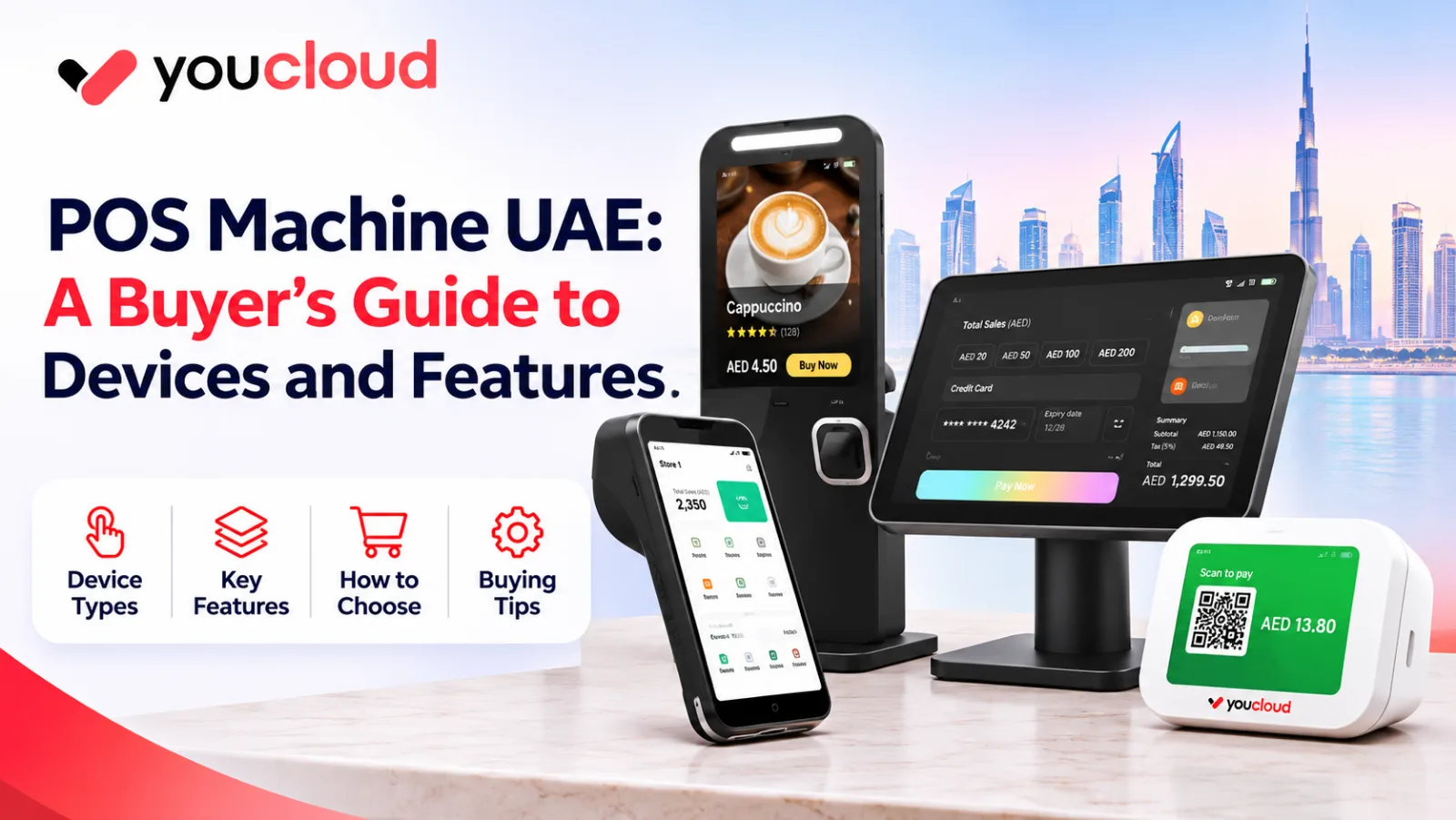
Looking for a POS machine UAE businesses can use every day? The right device can help you manage sales and serve customers faster.
However, every business has different needs. A small shop may need a handheld device. Meanwhile, a busy café may prefer a touchscreen or kiosk.
So, which machine should you choose?
This guide explains POS devices, useful features, and simple buying tips.
What Is a POS Machine?
A POS machine helps businesses record sales and manage checkout tasks.
For example, a shop can use it to create bills. A café can use it to take orders.
Some devices are portable. Others stay on a counter.
Also, POS software can help track stock and view sales reports.
Therefore, choosing the right hardware and software matters.
Types of POS Machines in the UAE
Different devices suit different businesses. Here are four common options.
1. Handheld POS Machine
A handheld POS is small and easy to carry.
For example, café staff can use it while serving customers.
Main features:
- Portable touchscreen
- Wireless connection
- Sales records
- Easy-to-carry design
However, check battery life and software support before buying.
2. Touchscreen POS Terminal
A touchscreen terminal suits shops with busy counters.
Its large screen makes billing and product selection easier.
Main features:
- Large display
- Product selection
- Sales tracking
- Compatible payment tools
For example, retail stores may use it with a barcode scanner.
As a result, staff can handle checkout tasks more easily.
3. Self-Service Kiosk
A self-service kiosk lets customers place orders on a screen.
For example, a fast-food outlet may use one near its entrance.
Main features:
- Customer-facing screen
- Menu display
- Order selection
- Supported payment options
Also, kiosks may help reduce queues.
However, check software and payment compatibility first.
4. QR Payment Device
A QR payment device shows a code for customers to scan.
It may suit businesses that offer supported digital payments.
Main features:
- Clear QR display
- Compact design
- Simple payment steps
- Compatible payment services
Therefore, confirm which payment options work in the UAE.
Key Features to Look for
A good POS machine should make daily work easier.
However, you only need features that match your business.
Easy Billing
A clear screen helps staff create bills quickly.
For example, simple product buttons can reduce checkout steps.
Stock Management
Retail shops need to track products and stock levels.
With suitable software, owners can review sales and inventory.
YouCloud's youShop supports retail sales and stock tasks.
Restaurant Orders
Cafés and restaurants need tools to manage orders.
For example, staff may send orders from the counter to the kitchen.
YouCloud's youResto supports restaurant workflows.
Payment Options
Customers may want different ways to pay.
Therefore, check card and QR payment support before buying.
Sales Reports
Reports help owners review daily sales.
For example, you can check which products sell well.
So, choose software with useful reporting tools.
Which POS Machine Fits Your Business?
Your business type can help you decide.
Small retail shop: A handheld POS may be enough. However, stores with many products may prefer a touchscreen and scanner.
Café or restaurant: A handheld device can support flexible service. Meanwhile, a touchscreen may suit the main counter.
Fast-food outlet: A self-service kiosk may help customers place orders.
Growing business: Check whether your software supports more devices, users, and branches.
Also, ask for a product demo before buying.
Why POS Software Matters
A device alone may not support every business task.
For example, retailers need stock tools. Restaurants may need order management.
YouCloud offers several solutions:
- youShop: Retail sales and inventory.
- youResto: Restaurant orders and kitchen tasks.
- Self-Service Kiosk: Let customers place their own orders.
- youPay: Supported digital payment services.
However, features and local availability may vary.
Therefore, confirm your needs with YouCloud first.
What to Check Before Buying
Before choosing a POS device, ask these questions:
- Is the screen easy to use?
- Does it fit your counter?
- Can it run your chosen software?
- Which payment methods work?
- Can you connect a printer or scanner?
- What warranty and support are included?
- How much do extra devices cost?
Also, compare the full setup rather than only the machine.
For more details about costs, explore the YouCloud UAE website.
FAQs About POS Machines
Which POS machine is best for a small shop?
A handheld device or touchscreen may work well. However, the best choice depends on your daily needs.
Can a POS machine track stock?
Yes, some POS systems include stock tools. For example, youShop supports retail inventory management.
Can restaurants use handheld POS devices?
Yes, compatible devices can support mobile order-taking.
Do all POS machines accept card payments?
No. Payment support depends on the device and provider.
Final Thoughts
Choosing the right POS machine starts with your business needs.
First, compare device types. Next, check software and payment options.
Finally, review support and costs before buying.
Ready to explore POS devices?
Visit YouCloud UAE to find a setup for your shop, café, or restaurant.